How to change the default square thumbnails of WooCommerce Product Images

How to change the default square thumbnails of WooCommerce Product Images

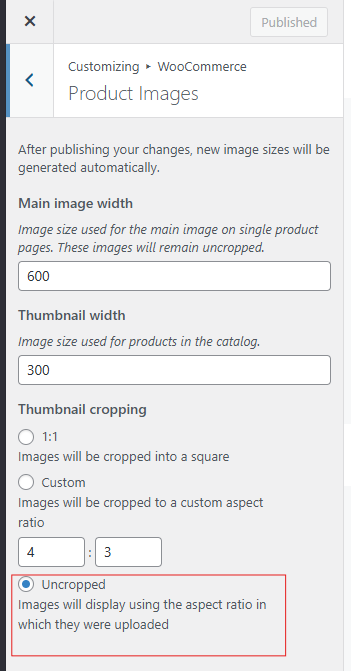
While the default square thumbnail of WooCommerce Product Images works for many shops, it’s not ideal if your products have important details that get cropped out.

Figuring this out took longer than expected because instead of being in WooCommerce > Settings > Products, this setting is tucked away in the WordPress Customizer.

How to Fix It:

  1. Go to Appearance > Customize
  2. Navigate to WooCommerce > Product Images
  3. Select Uncropped
  4. Publish your changes

Now, your thumbnails will retain their original aspect ratio instead of being forced into a square crop. This simple tweak ensures that your product images display exactly how you want them to, without losing important details.

I'd still prefer if this setting was in WooCommerce > Settings > Products instead of the Customizer.


  • Audentes fortuna iuvat. — Virgil
  • Aut viam inveniam aut faciam. — Hannibal Barca
  • Inveniam viam aut faciam. — Seneca
  • Fortis cadere, cedere non potest. — Latin Proverb
  • Non ducor, duco. — Motto of São Paulo
  • Per aspera ad astra. — Latin Proverb
  • Si vis pacem, para bellum. — Vegetius
  • Acta non verba. — Latin Proverb
  • Vincit qui se vincit. — Latin Proverb
  • Temet nosce. — Latin translation of the Delphic maxim
  • Ignis aurum probat, miseria fortes viros. — Seneca
  • Tandem fit surculus arbor. — Latin Proverb
  • Faber est suae quisque fortunae. — Appius Claudius Caecus
  • Labor omnia vincit improbus. — Virgil
  • Gutta cavat lapidem, non vi, sed saepe cadendo. — Ovid
  • Semper fidelis. — Latin Motto
  • Dum spiro, spero. — Cicero
  • Invictus maneo. — Latin Proverb
  • Nec aspera terrent. — Latin Motto
  • Amor fati. — Friedrich Nietzsche
"> ');